
A fast, safe and easy way to make loan payments.
We’re making things easier. Message Pay allows you to quickly make a payment to your U1 loan or credit card from any external account - by text, online or through Online & Mobile Banking.
Fast: Make a payment in just a few clicks - no lenghty processes.
Safe: Your information is encrypted and protected. Payments can be made from checking accounts or debit cards.*
Easy: Pay securely from your smartphone, tablet, laptop, or home computer.
Ways to Pay:
- Pay by text – After a quick one-time setup, you'll be able to make payments by simply replying to a text message.
- You will receive a text message with your loan amount due
- The text will come from: 937-468-4105
- The text will contain a unique link to complete your account setup and payment
- Pay through our website – Prefer not to pay by text? You can securely make payments anytime through the U1 website or through Online & Mobile Banking.
What to Expect:
Members with a loan will receive an initial text message inviting them to enroll in Message Pay.
- Reply YES to enable pay‑by‑text
- Reply STOP at any time to opt out
- Choosing not to enroll will not affect your ability to pay online or manage your loan through other channels
First-time Setup:
Members with a loan will receive an initial text message inviting them to enroll in Message Pay.
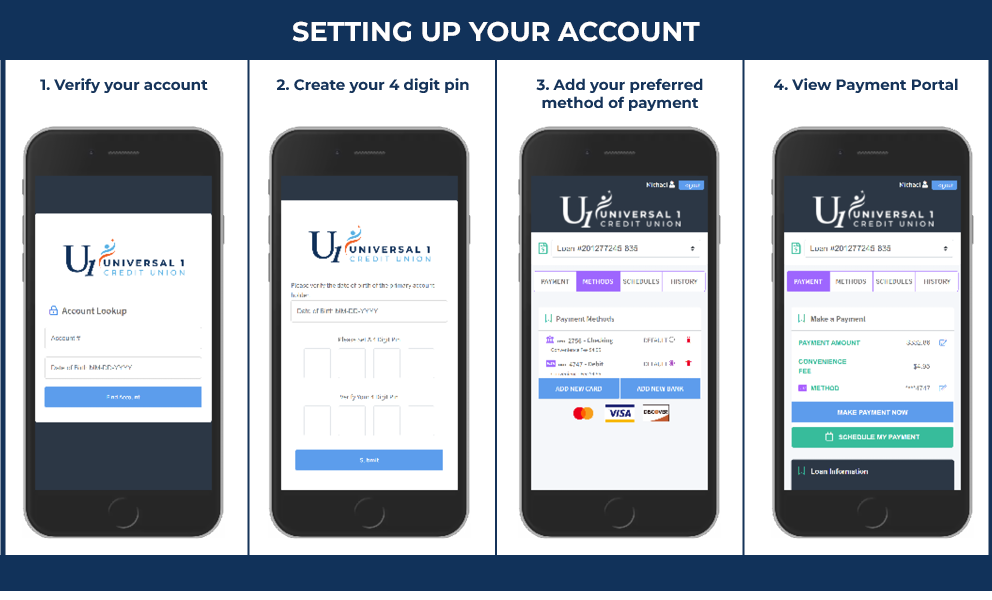
- Click the secure link that you received via text message in order to set up your Message Pay account
- Verify your account using your account number and date of birth
- Create your 4-6 digit PIN for future payments
- Add a payment method. You can add multiple methods and select which method is to be the "default" payment method. You can do this by selecting 'ADD NEW DEBIT CARD' or 'ADD NEW BANK ACCOUNT' which will prompt a secure website for you to input your information. If done correctly, there will be a message stating ‘Payment Method Success’ and you will be redirected to the payment portal.
- Once your account has been successfully verified, you will be directed to the payment portal where you’ll be able to see all of your loans and will also be able to select your preferred payment method.
Member Benefits:
- The transaction fee is only $4.95
- Encrypted information guarantees your information is secure
- Convenient ways to pay from an external account: text, website, online/mobile banking
- Payments accepted from checking accounts, savings accounts and credit cards
We understand how important convenience and control are when it comes to managing your finances. That’s why this service is completely optional. You can opt out at any time if you no longer wish to receive them. Even if you choose not to use the text option, you can still pay securely through our website.
We also want you to feel confident using Message Pay.
- Message Pay texts will come from 937-468-4105
- U1 will never ask for your Social Security number, online banking password, or full account credentials via text
If anything feels off, please call us directly at 937‑431‑3100, option 0.
MessagePay FAQ's